The best AI apps to restore your old photos and bring them back to life
Our expert tests the top AI image apps to find out whether they really can restore and animate your old photos.
Our expert tests the top AI image apps to find out whether they really can restore and animate your old photos.
Almost every wonder of modern technology, from fire to the telephone to spray cream, was once briefly considered miraculous, then became run-of-the-mill.
So it’s possible that by the dim and distant future – next month or even later – we will take generative AI for granted. Our grandchildren’s generation is already blasé about this new technology. Nonetheless, I am knocked out and pants-charmed-off by what it can do.
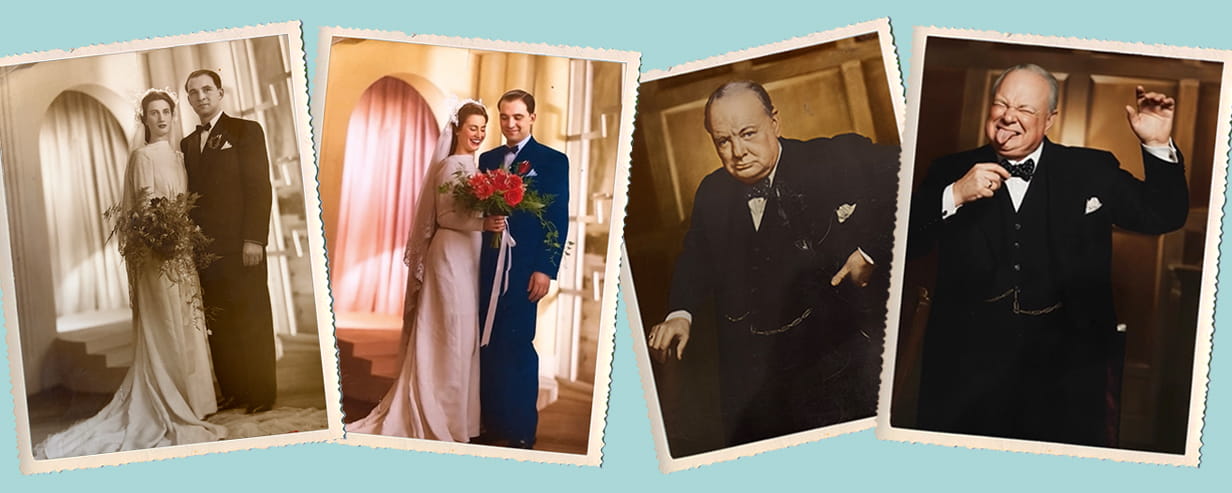
For example, I’ve had the best fun in a long time trying out some new photo enhancement apps, which will turn a torn, out-of-focus, smudgy old black-and-white print into a pristine, sharp, colour photo in a few seconds.
Even more remarkable, these phone apps – of which there are dozens – will make a fist of transforming an old photo into a plausible clip of video, using its imagination to simulate what might have happened in the seconds after the shutter clicked.
I’ve tried out four of the best, using my parents’ formal 1948 wedding photo as one test subject, and a solemn picture of Sir Winston Churchill as another. The latter is on a 1950s biscuit tin I bought in a junk shop in Nottingham.
In each case, you use your phone camera to capture the image you want to change.

The first I tried, YouCam Enhance (Android, iOS), did a superb job of colourising and sharpening, but the app was rather fussy (free to start, then £6.67 a week or £79.99 a year).
The second, Renew (Android, iOS), was simpler and allows more free use before you have to start paying (up to £9.99 a week or £49.99 a year).
I had two favourites. The first, the Apple-only Nostalgia AI (iOS), you need to pay for. However, it only costs £4.99 a week (after which you can stop your subscription), and you could get a lot done in that time.
The other is Elon Musk’s AI platform Grok (Android, iOS). Though it was limited at the time I tried it, only letting you turn snaps into videos, it offers superb value, costing nothing to use.
For the sepia wedding photo, I used a mix of apps, exploiting the free bits of each. So, I colourised it with Enhance, sharpened it with Renew, then converted it to ten seconds of video with Nostalgia AI. My parents, from long before I was born, were magically alive again, young and happy. It was extraordinary.
For Churchill, I did the same but enlivened him with Grok. With this app, you type in what you want the subject to do in the video. I asked it to make a silly Winston, and it showed him clowning quite plausibly.
Two caveats: one is that if you can’t see the subject’s teeth in the photo, the apps will default to a gleaming set of all-American choppers, which can look weird.
Secondly, the app makers are not philanthropists – be careful to avoid accidentally paying more than you need.


Your chance to win cruise for two to Cádiz, Casablanca and the Canary Islands, worth more than £9,600.

Treat someone special to a Saga Magazine subscription – 12 inspiring issues for just £34.95. Plus, you will also enjoy three free gifts: a cotton tote bag, a bumper puzzle book and a box of Guylian Seashell chocolates.
Every issue is packed with real-life stories, exclusive celebrity interviews, insightful articles and practical tips on health, finance, travel, and more. A thoughtful gift that entertains all year round.

Ingenious speakers, brilliant earbuds, nifty note takers - our expert picks his top tech gifts.

Electric models are set to dominate the market next year, including a flood of budget Chinese brands.

How breaking my phone ruined one of the best nights of my life – and the expert lessons that will help you avoid my mistakes.

New to podcasts? Here’s our straightforward guide to finding them, playing them and enjoying them.

Our pick of the best EVs - from spacious SUVs to compact city cars.

As the use of contactless soars, our columnist asks what can be done to prevent discrimination against those still wanting to use cash.
Follow our step-by-step guide to find out your internet speed - and whether it’s your device or broadband that’s slowing you down.
These video doorbells show you who's at your door, even when you aren't home.
We explain everything you need to know to connect an iPhone to an Apple Watch.
Think you know how to use WhatsApp? We've got some handy tips to help you get the most out of the messaging app.